

Download iTop Screen Recorder – Free Screen Recording & Video Editing Tool for Windows
Looking for a reliable, easy-to-use screen recording software for Windows? iTop Screen Recorder is a powerful, free tool designed for anyone who wants to capture high-quality screen activity with built-in video editing features. Whether you're recording online meetings, creating tutorial videos, streaming gameplay, or producing content for YouTube and social media, iTop Screen Recorder delivers professional-grade results without the steep learning curve. With support for 4K recording at 120 FPS, customizable capture modes, and a smart built-in editor, this software stands out as one of the best free screen recorder options available. Download iTop Screen Recorder today and unlock seamless screen capture, audio recording, and quick editing—all in one intuitive app.
Why iTop Screen Recorder Is a Must-Have for Windows Users
Advanced Features That Elevate Your Content Creation
Beyond basic screen capture, iTop Screen Recorder offers several advanced features that set it apart from competitors. The auto-scroll teleprompter function is a hidden gem for content creators and educators. Simply type your script, and the text will scroll automatically as you speak, helping you deliver smooth, error-free recordings without memorizing lines. This is especially useful for YouTube creators, online instructors, and corporate trainers. The webcam customization options are also impressive. You can flip, rotate, resize, and reposition your webcam feed with precision. Want to blur your background or replace it with a virtual backdrop? The app supports real-time background removal and replacement—ideal for maintaining privacy or branding your videos. These tools are typically found in premium software, but iTop delivers them for free. For gamers and streamers, the ability to record 2D and 3D games at high frame rates (up to 120 FPS) ensures smooth, stutter-free gameplay captures. The software efficiently manages system resources, minimizing lag even during intensive sessions. You can also disable mouse tracking or speaker audio if needed, giving you full control over what appears in your recording. The integration with popular platforms like YouTube, Vimeo, and social media is seamless. Once your video is edited, you can publish directly from the app with just a few clicks. This saves time and streamlines the content distribution process, making iTop Screen Recorder a complete solution for creators.How to Install and Use iTop Screen Recorder on Windows
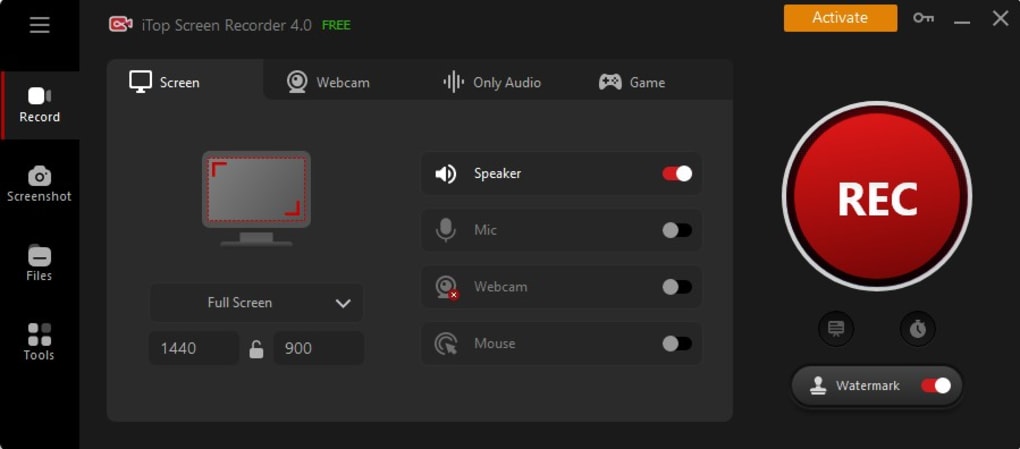
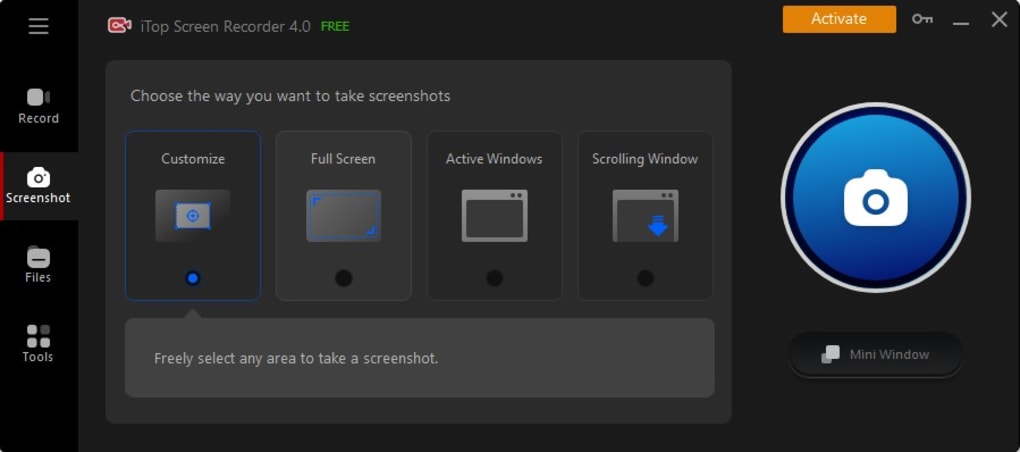
Getting started with iTop Screen Recorder is straightforward. First, visit the official website and download the installer for Windows. The app is compatible with Windows 7 and later, including Windows 10 and Windows 11. Ensure your system meets the minimum requirements: a 1 GHz processor, 2 GB RAM, and at least 1 GB of free disk space. A screen resolution of 1024×768 or higher is recommended for optimal performance. After downloading, run the installer and follow the on-screen prompts. The setup process is quick and installs the software without cluttering your system. Once installed, launch the app to access the clean, intuitive interface. The main screen presents three primary recording modes: Screen, Audio, and Game. Choose the one that fits your needs. Before starting a recording, customize your settings. You can enable or disable microphone input, system audio, webcam, and mouse cursor tracking. For advanced users, navigate to the settings menu to adjust video codecs (H.264, H.265), frame rates, resolution (up to 4K), and audio quality. These options ensure your recordings meet your desired output standards. To begin recording, click the red record button. You can choose to capture the entire screen, a specific window, or a custom area by dragging the selection box. The recording starts instantly, and a small overlay shows the status and countdown timer. When finished, click the stop button. The video is automatically saved to your designated folder, and you can immediately open it in the built-in editor for trimming, adding effects, or exporting.Pro Tips for Optimal Performance
To get the best results, close unnecessary background apps before recording to free up system resources. Use a wired microphone for clearer audio, and consider recording in 1080p or 4K depending on your intended use. For long recordings, use the Pro version to remove the two-minute time limit. Also, regularly update the software to benefit from bug fixes, performance improvements, and new features.Compatibility and System Requirements
iTop Screen Recorder is exclusively designed for Windows operating systems. It supports Windows 7, 8, 10, and 11, making it accessible to a wide range of users. The software is optimized for both 32-bit and 64-bit systems and runs efficiently on modern hardware. While it’s not available for Mac, Android, or iOS, Windows users will find it a reliable and lightweight solution. The minimum system requirements are modest, ensuring compatibility with most PCs. However, for 4K recording or high-frame-rate gameplay, a more powerful GPU and at least 4 GB of RAM are recommended. The app uses hardware acceleration where available, reducing CPU load and improving recording stability. The software integrates well with other Windows applications. It appears in the Quick Launcher menu, allowing one-click access to frequently used recording sources like web browsers, video conferencing tools, and streaming platforms. This seamless integration enhances workflow efficiency.Pros and Cons of iTop Screen Recorder
- Pros:
- Free version available with essential recording and editing tools
- Supports 4K recording at 120 FPS
- Built-in video editor with trimming, speed adjustment, text, and watermark features
- Real-time webcam overlay and background customization
- AI-powered voice changer and noise reduction tools
- Direct upload to YouTube, Vimeo, and social media
- Lightweight and fast with minimal system impact
- Auto-scroll teleprompter for smooth video delivery
- Cons:
- Free version limits recordings to 2 minutes
- Not available for Mac, iOS, or Android
- Advanced features require a Pro license
- Occasional lag on older or low-end hardware
- Limited customization in free version







